
FaceSwap Review: An impressive AI face Swapper for free
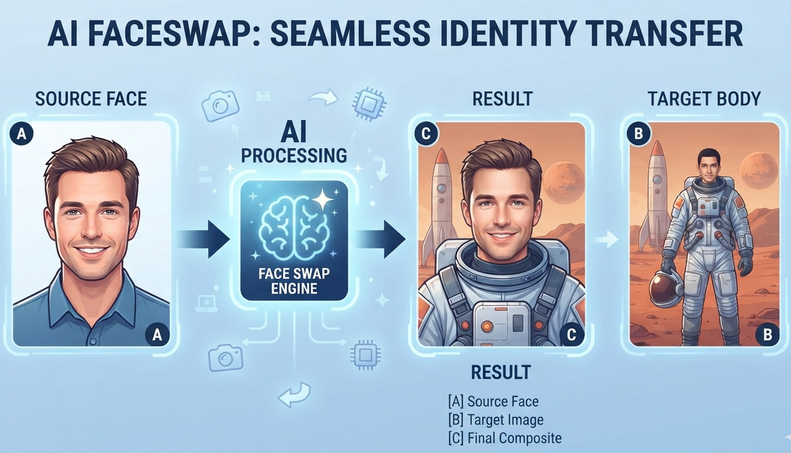
AI photo editing tools now enable ordinary users make entertaining images without learning complicated software. FaceSwap is an online AI face swap tool that replaces a face in one picture with a face from another.
In this review, we examine its features, output quality, ease of use, limitations and overall value. This guide will help you decide if the tool suits memes, digital artwork, marketing concepts, social media posts or personal entertainment.
What Is FaceSwap?
FaceSwap is a browser based photo editor powered by artificial intelligence. Users upload a major photo and a second image containing the replacement face. The system identifies facial details and combines new face into the target image.
Unlike conventional editing software, it does not need manual cutting, masking or modern design skills. This makes it beneficial for content creators, beginners, social media managers and designers who want quick results.
FaceSwap for Android
If you want to use the FaceSwap on your android phone, the app can perform much faster. You can download it from Play Store For PC site.
Key Features of the FaceSwap AI Tool
1. Simple Online Interface
The tool gives a clear upload and process workflow. Users do not require to install software or understand complex photo editing controls. It can be accessed through supported mobile and desktop web browsers.
2. Realistic AI Results
FaceSwap attempts to match facial position, skin tone, lighting and expression. The best results comes from well lit photos with similar facial angles.
Strong shadows, covered facial features, glasses, blurred faces or side profile images may decrease the quality of the final result.
3. Fast Image Processing
Most basic face swaps can be made within a short time. This feature is beneficial for people preparing memes, entertainment posts, profile images or early creative concepts.
4. Common Image Format Support
The current photo swap tool supports common formats like PNG and JPG. High resolution images are recommended as they give the AI with more facial details to process.
How to Use FaceSwap?
Using this free face swap online tool involves a few easy steps:
- Open the FaceSwap or Pollo AI face swap page.
- Upload the image containing the face you need to replace.
- Then Upload another photo containing the new face.
- Start the AI face-swapping process.
- Preview the generated result.
- Finally download the edited image.
For cleaner result, select photos with clearly visible facial features, balance lighting and similar head positions. Try using a different source image, if the result looks unnatural.
FaceSwap Performance and Image Quality
FaceSwap works well for casual editing and creative experiments. It automatic facial detection eliminates much of the manual work normally needed in professional photo editing programs.
With suitable images, the replacement face can merge naturally with the target person’s position, skin tone and expression. The result will not be perfect in every situation.
Popular Uses for FaceSwap
The free AI face swapper can support numerous harmless creative projects. Social media users can make funny posts or place themselves in movie-style scenes. Meme creators can test various faces, expressions and reactions.
Designers may use the tool to prepare visual concepts and marketers can experiment with non sensitive promotional mockups.
Advantages of FaceSwap
The major advantage of FaceSwap is its ease of use. It needs no software installation and can produce results quickly. Its browser based interface makes it appropriate for beginners who have limited photo editing experience.
It can save time for creators who need speedy visual ideas. When clear and well matched images are uploaded, the results are convincing enough for casual social media content.
Possible Limitations
The major limitation is that output quality depends on the uploaded images. Poor lighting, difficult camera angles or low resolution photos may give unnatural results.
Free usage is limited by available credits. The tool gives fewer manual editing controls than professional software.
The current photo face swap feature mainly focuses on replacing one face at a time. Users working with large group photos or detailed commercial projects might need more specialized editing software.
Final Verdict
This FaceSwap review finds that the tool is a preferred option for quick AI powered photo editing. It is best suited to meme creators, beginners, social media users and designers testing creative ideas.
The platform is simple to access and can make realistic results from clear and well-matched photos. Although free usage is limited by credits and difficult images might need extra editing, FaceSwap is worth trying for casual creative projects.
Frequently Asked Questions
1. Is FaceSwap completely free?
FaceSwap provides limited free credits. Regular or frequent usage require a paid subscription.
2. Can I use FaceSwap on a mobile phone?
The tool works through supported mobile and desktop web browsers.
3. Which image formats does FaceSwap support?
The current tool supports common image formats such as JPG and PNG.
4. Can FaceSwap replace multiple faces?
The current photo tool mainly replaces one target face at a time.
5. How can I improve FaceSwap results?
Use high-resolution images with visible facial features, good lighting and similar face angles.